
Finding the best IPTV player in 2026 can feel overwhelming. With hundreds of apps flooding the market, each claiming to be the ultimate solution for streaming live TV, movies, and sports, how do you separate the genuinely great from the mediocre?
The truth is simple: the best IPTV player depends on your specific needs, devices, and streaming habits. What works perfectly for a Firestick user might not be ideal for someone streaming on an Android phone or Smart TV. Some players excel at live TV stability, others shine with video-on-demand libraries, and a select few manage to deliver excellence across every category.
At GO BEST IPTV, we’ve tested virtually every IPTV application on the market. We know which players deliver buffer-free streams, which ones protect your privacy, and which ones waste your time with constant crashes and confusing interfaces. This guide isn’t just a list — it’s a comprehensive breakdown of what actually matters when choosing the best IPTV player for your setup.
By the end of this article, you’ll understand the key features that separate top-tier players from the rest, know exactly which apps work best on your devices, and have a clear recommendation based on your specific streaming needs. Whether you’re cutting the cord for the first time or upgrading from a basic player, this guide has you covered.
What Is an IPTV Player?
Before diving into specific recommendations, let’s clarify what an IPTV player actually does. Unlike Netflix or Hulu, which come bundled with their own content, an IPTV player is simply the application that reads and displays streams from your IPTV subscription provider.
Think of it like this: your IPTV subscription is the fuel, and the best IPTV player is the high-performance engine that burns it efficiently. Without a quality player, even the most premium subscription will deliver a frustrating experience filled with buffering, crashes, and poor video quality.
How IPTV Players Work
Table
| Component | Function |
|---|---|
| Playlist Parser | Reads M3U or Xtream Codes API data |
| Stream Decoder | Processes video/audio codecs |
| EPG Handler | Displays electronic program guide |
| User Interface | Organizes channels and VOD content |
| Network Buffer | Preloads data to prevent interruptions |
The best IPTV player optimizes every single one of these components. A weak player might handle the playlist fine but struggle with codec compatibility. Another might look beautiful but fail to maintain stable connections during peak viewing hours.
Why the Player Matters More Than You Think
Many newcomers assume that their streaming quality depends entirely on their internet speed and IPTV provider. While both factors are crucial, the player itself can make or break your experience. Here’s why:
- Codec Support: The best IPTV player supports H.264, H.265 (HEVC), MPEG-2, and AV1 codecs. Older or poorly maintained players often choke on modern compression standards.
- Buffer Management: Intelligent buffering algorithms predict network fluctuations and preload sufficient data. Cheap players use basic buffering that causes constant interruptions.
- EPG Integration: A quality player fetches and formats program guides accurately. Inferior apps display “No Information” for half your channels.
- Device Optimization: The best IPTV player for Firestick differs from the best IPTV player for Android TV because each platform has unique hardware capabilities and limitations.
Top 10 Best IPTV Players in 2026
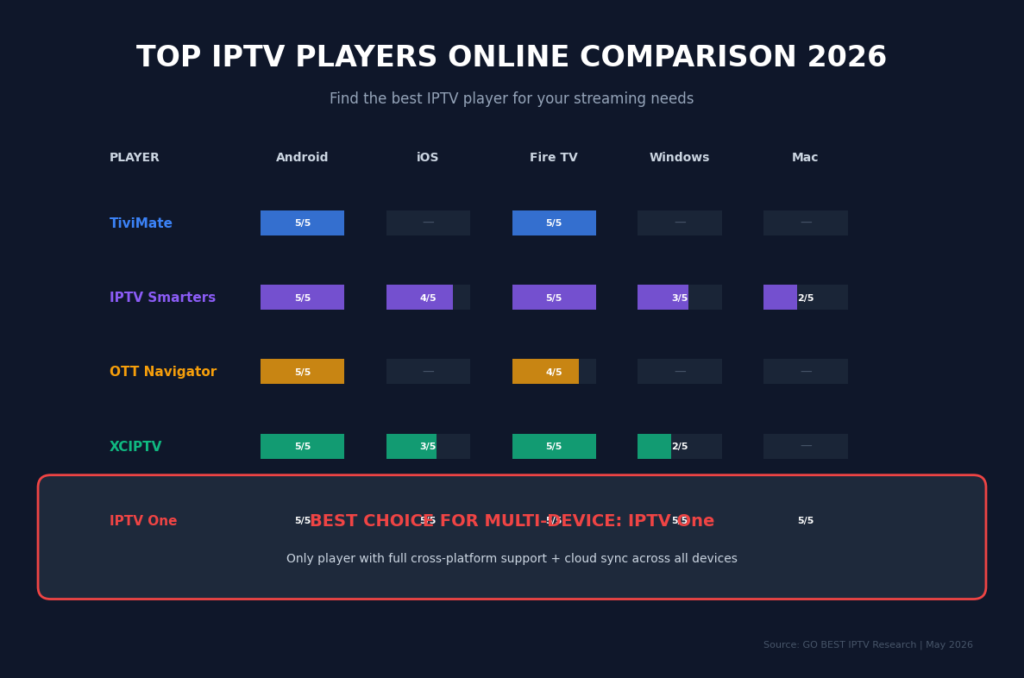
After extensive testing across multiple devices, network conditions, and IPTV providers, here are our rankings for the best IPTV player options available today.
1. IPTV Smarters Pro — The Overall Best IPTV Player
Best For: All-around excellence, multi-device households, power users
Platforms: Firestick, Android, iOS, Smart TV, Windows, Mac, Web
Table
| Feature | Rating |
|---|---|
| Ease of Use | ⭐⭐⭐⭐⭐ |
| Feature Set | ⭐⭐⭐⭐⭐ |
| Stability | ⭐⭐⭐⭐⭐ |
| Device Support | ⭐⭐⭐⭐⭐ |
| Value | ⭐⭐⭐⭐⭐ |
Why It Tops the List:
IPTV Smarters Pro consistently delivers the most balanced experience of any best IPTV player contender. The interface feels modern and intuitive, borrowing design cues from Netflix while maintaining the functionality power users demand.
Key Strengths:
- Multi-screen support allows watching up to 4 channels simultaneously
- Advanced EPG with automatic updates and catch-up TV integration
- External player support (VLC, MX Player) for problematic streams
- Recording capability to save live TV directly to device storage
- Parental controls with PIN protection for specific categories
- Chrome casting for sending streams to larger displays
Pricing: Free version available; Pro version one-time purchase (~$2.99-$5.99 depending on platform)
Verdict: If you want one player that handles everything well, IPTV Smarters Pro is the best IPTV player choice for 2026.
2. TiviMate — Best IPTV Player for Android TV
Best For: Android TV boxes, NVIDIA Shield, dedicated streaming setups
Platforms: Android TV, Google TV, Fire TV (sideloaded)
Table
| Feature | Rating |
|---|---|
| Ease of Use | ⭐⭐⭐⭐⭐ |
| Feature Set | ⭐⭐⭐⭐⭐ |
| Stability | ⭐⭐⭐⭐⭐ |
| Device Support | ⭐⭐⭐⭐ |
| Value | ⭐⭐⭐⭐⭐ |
Why It Stands Out:
TiviMate has earned a cult following among Android TV enthusiasts, and for good reason. This best IPTV player contender offers the most polished interface specifically designed for television screens and remote control navigation.
Key Strengths:
- TV-optimized UI with smooth remote navigation
- Playlist grouping for organizing hundreds of channels logically
- Customizable channel logos and EPG layouts
- Scheduled recording with automatic series capture
- Multiple playlist support for combining different subscriptions
- Search functionality that actually works across live and VOD content
Pricing: Free trial; Premium ~$4.99/year or $19.99 lifetime
Verdict: If you primarily watch on Android TV or NVIDIA Shield, TiviMate is arguably the best IPTV player for your setup.
3. Perfect Player — Best IPTV Player for Simplicity
Best For: Beginners, minimalists, older devices
Platforms: Android, Firestick, Windows, Linux
Table
| Feature | Rating |
|---|---|
| Ease of Use | ⭐⭐⭐⭐⭐ |
| Feature Set | ⭐⭐⭐⭐ |
| Stability | ⭐⭐⭐⭐⭐ |
| Device Support | ⭐⭐⭐⭐ |
| Value | ⭐⭐⭐⭐⭐ |
Why Users Love It:
Sometimes you don’t need 50 features. You need a player that loads your channels quickly, plays them smoothly, and stays out of your way. Perfect Player embodies this philosophy, making it the best IPTV player for users who value simplicity.
Key Strengths:
- Lightweight — runs smoothly even on older hardware
- Clean, no-nonsense interface
- Fast channel zapping with minimal delay
- Scalable OSD (on-screen display) for adjusting settings during playback
- Multiple decoder options for troubleshooting compatibility issues
- Completely free with no premium upsells
Pricing: Free
Verdict: For beginners or anyone frustrated by bloated apps, Perfect Player is the best IPTV player for pure simplicity.
4. GSE Smart IPTV — Best IPTV Player for iOS
Best For: iPhone, iPad, Apple TV users
Platforms: iOS, tvOS, Android, Firestick
Table
| Feature | Rating |
|---|---|
| Ease of Use | ⭐⭐⭐⭐⭐ |
| Feature Set | ⭐⭐⭐⭐ |
| Stability | ⭐⭐⭐⭐ |
| Device Support | ⭐⭐⭐⭐ |
| Value | ⭐⭐⭐⭐ |
Why iOS Users Choose It:
Apple’s ecosystem is notoriously restrictive with IPTV apps, but GSE Smart IPTV navigates these limitations brilliantly. For iPhone, iPad, and Apple TV users, this is often the best IPTV player available.
Key Strengths:
- Native iOS design that feels like a real Apple app
- Xtream Codes API and M3U support
- Chromecast and AirPlay support for external displays
- EPG timeshifting for timezone adjustments
- Parental control with channel locking
- Dynamic language switching
Pricing: Free with ads; Premium ~$4.99 to remove ads
Verdict: Apple device owners should start here when searching for the best IPTV player.
5. Flix IPTV — Best IPTV Player for Samsung/LG TVs
Best For: Samsung Tizen and LG WebOS Smart TVs
Platforms: Samsung Smart TV, LG Smart TV, Android, Firestick
Table
| Feature | Rating |
|---|---|
| Ease of Use | ⭐⭐⭐⭐⭐ |
| Feature Set | ⭐⭐⭐⭐ |
| Stability | ⭐⭐⭐⭐ |
| Device Support | ⭐⭐⭐⭐ |
| Value | ⭐⭐⭐⭐ |
Why Smart TV Owners Need It:
Installing third-party apps on proprietary Smart TV platforms can be challenging. Flix IPTV solves this by being readily available in both Samsung’s and LG’s official app stores, making it the best IPTV player for these specific televisions.
Key Strengths:
- Official app store availability — no sideloading required
- Optimized for TV remotes with intuitive navigation
- Multiple playlist support
- Customizable interface themes
- External subtitle support
- VOD series continuation (remembers your episode)
Pricing: Free trial (1 hour); then ~$2.99 one-time activation per device
Verdict: If you watch exclusively on Samsung or LG TVs, Flix IPTV is your best IPTV player option.
6. XCIPTV Player — Best IPTV Player for Customization
Best For: Users who want to brand their experience, resellers
Platforms: Android, Firestick, iOS
Table
| Feature | Rating |
|---|---|
| Ease of Use | ⭐⭐⭐⭐ |
| Feature Set | ⭐⭐⭐⭐⭐ |
| Stability | ⭐⭐⭐⭐ |
| Device Support | ⭐⭐⭐⭐ |
| Value | ⭐⭐⭐⭐⭐ |
Why It Differentiates:
XCIPTV (also known as OTT Navigator in some versions) offers unprecedented customization options. If you want your player to look and feel unique, this is the best IPTV player for personalization.
Key Strengths:
- Highly customizable UI — change colors, layouts, fonts
- Multiple portal support for managing several subscriptions
- Built-in speed test to diagnose connection issues
- VPN integration for privacy-conscious users
- Backup and restore settings functionality
- Multi-language support with 20+ options
Pricing: Free; Pro features via subscription
Verdict: Customization enthusiasts and IPTV resellers will find XCIPTV the best IPTV player for their needs.
7. IPTV Extreme Pro — Best IPTV Player for Recording
Best For: Users who prioritize DVR functionality
Platforms: Android, Firestick
Table
| Feature | Rating |
|---|---|
| Ease of Use | ⭐⭐⭐⭐ |
| Feature Set | ⭐⭐⭐⭐⭐ |
| Stability | ⭐⭐⭐⭐ |
| Device Support | ⭐⭐⭐⭐ |
| Value | ⭐⭐⭐⭐ |
Why Recording Matters:
While many players offer basic recording, IPTV Extreme Pro takes it to another level with scheduled recordings, series capture, and cloud integration. For the DVR-obsessed, this is the best IPTV player.
Key Strengths:
- Advanced recording scheduler with series link functionality
- Chromecast and DLNA streaming to other devices
- Internal and external player support
- Backup/restore of all settings and recordings
- Remote control support for various Android TV boxes
- Picons (channel icons) automatic download
Pricing: Free version; Pro ~$4.99
Verdict: If recording live TV is your priority, this is the best IPTV player available.
8. OTT Navigator — Best IPTV Player for Advanced Users
Best For: Tech-savvy users, tinkerers, multiple subscription managers
Platforms: Android, Firestick, Android TV
Table
| Feature | Rating |
|---|---|
| Ease of Use | ⭐⭐⭐ |
| Feature Set | ⭐⭐⭐⭐⭐ |
| Stability | ⭐⭐⭐⭐⭐ |
| Device Support | ⭐⭐⭐⭐ |
| Value | ⭐⭐⭐⭐⭐ |
Why Power Users Adore It:
OTT Navigator sacrifices some beginner-friendliness for raw power and flexibility. If you manage multiple IPTV subscriptions and love tweaking every setting, this is your best IPTV player.
Key Strengths:
- Multiple provider support with separate profiles
- Advanced search across all subscriptions simultaneously
- Customizable home screen with widgets
- Picture-in-picture and background playback
- Detailed statistics about stream quality and buffering
- Open-source foundation with active community development
Pricing: Free
Verdict: Advanced users seeking maximum control should choose OTT Navigator as their best IPTV player.
9. Televizo — Best IPTV Player for Modern Android
Best For: Latest Android devices, Material Design fans
Platforms: Android, Android TV
Table
| Feature | Rating |
|---|---|
| Ease of Use | ⭐⭐⭐⭐⭐ |
| Feature Set | ⭐⭐⭐⭐ |
| Stability | ⭐⭐⭐⭐⭐ |
| Device Support | ⭐⭐⭐⭐ |
| Value | ⭐⭐⭐⭐⭐ |
Why Modern Design Matters:
Televizo brings Google’s latest Material Design language to IPTV, resulting in an app that feels native to modern Android devices. For aesthetic purists, this is the best IPTV player.
Key Strengths:
- Beautiful Material Design interface
- Smooth animations and transitions
- Android TV optimized with proper banner and channel rows
- Light and dark themes
- Auto-updating EPG with beautiful program art
- Completely free with no ads
Pricing: Free
Verdict: If you value modern design aesthetics, Televizo is the best IPTV player for your Android ecosystem.
10. DuplexPlay — Best IPTV Player for WebOS
Best For: LG WebOS Smart TVs specifically
Platforms: LG WebOS, Samsung Tizen, Android
Table
| Feature | Rating |
|---|---|
| Ease of Use | ⭐⭐⭐⭐⭐ |
| Feature Set | ⭐⭐⭐⭐ |
| Stability | ⭐⭐⭐⭐ |
| Device Support | ⭐⭐⭐⭐ |
| Value | ⭐⭐⭐ |
Why LG Users Consider It:
DuplexPlay offers another solid option for LG television owners, with specific optimizations for WebOS that make navigation feel natural.
Key Strengths:
- Native WebOS integration
- Simple setup with QR code playlist loading
- Favorite channels and categories
- Timeshift support for pausing live TV
- Multiple audio track selection
Pricing: Free trial; activation ~$1.99 per device annually
Verdict: LG WebOS users should compare DuplexPlay with Flix IPTV to determine their personal best IPTV player.
Best IPTV Player Comparison Table
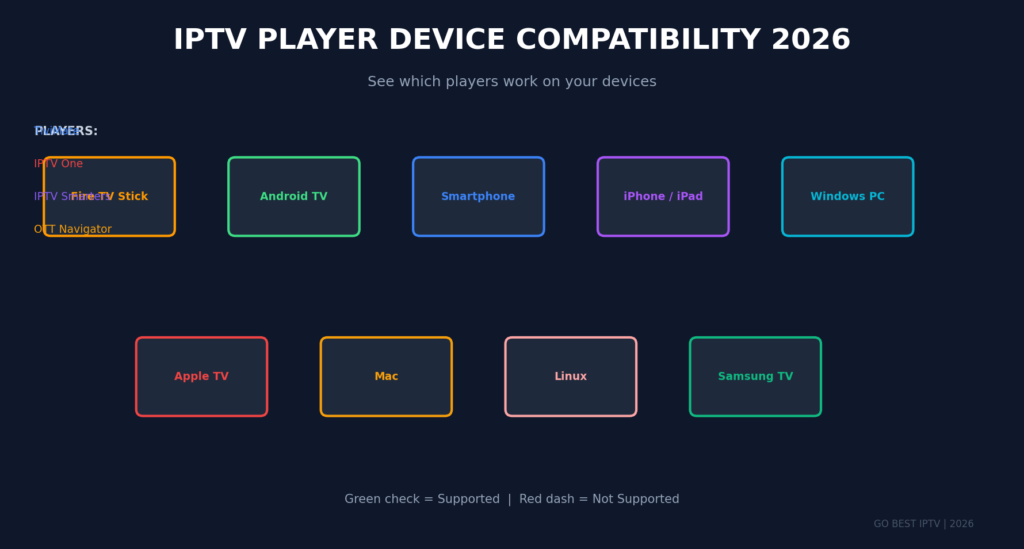
Table
| Player | Best For | Price | Multi-Screen | Recording | EPG | Ease of Use |
|---|---|---|---|---|---|---|
| IPTV Smarters Pro | Overall best | Free/Paid | ✅ 4 screens | ✅ | ✅⭐ | ⭐⭐⭐⭐⭐ |
| TiviMate | Android TV | Free/Paid | ✅ | ✅ | ✅⭐ | ⭐⭐⭐⭐⭐ |
| Perfect Player | Simplicity | Free | ❌ | ❌ | ✅ | ⭐⭐⭐⭐⭐ |
| GSE Smart IPTV | iOS devices | Free/Paid | ❌ | ❌ | ✅ | ⭐⭐⭐⭐⭐ |
| Flix IPTV | Samsung/LG TVs | Paid | ❌ | ❌ | ✅ | ⭐⭐⭐⭐⭐ |
| XCIPTV | Customization | Free | ❌ | ❌ | ✅ | ⭐⭐⭐⭐ |
| IPTV Extreme Pro | Recording | Free/Paid | ❌ | ✅⭐ | ✅ | ⭐⭐⭐⭐ |
| OTT Navigator | Advanced users | Free | ✅ | ❌ | ✅⭐ | ⭐⭐⭐ |
| Televizo | Modern Android | Free | ❌ | ❌ | ✅ | ⭐⭐⭐⭐⭐ |
| DuplexPlay | LG WebOS | Paid | ❌ | ✅ | ✅ | ⭐⭐⭐⭐⭐ |
How to Choose the Best IPTV Player for Your Needs
With so many excellent options, selecting the best IPTV player for your specific situation requires considering several factors.
Factor 1: Your Primary Device
Table
| Device | Recommended Best IPTV Player | Reason |
|---|---|---|
| Firestick 4K Max | IPTV Smarters Pro | Optimized for Fire OS, sideloading easy |
| NVIDIA Shield | TiviMate | Android TV native, powerful hardware utilized |
| Samsung Smart TV | Flix IPTV | Official app store availability |
| LG Smart TV | Flix IPTV or DuplexPlay | WebOS optimization |
| iPhone/iPad | GSE Smart IPTV | iOS native design, App Store available |
| Android Phone | IPTV Smarters Pro or Televizo | Touch-optimized, feature-rich |
| Windows PC | IPTV Smarters Pro or Perfect Player | Desktop interface, keyboard support |
| Mac | IPTV Smarters Pro | Cross-platform consistency |
Factor 2: Your Streaming Priorities
Table
| Priority | Best IPTV Player Choice |
|---|---|
| Maximum features | IPTV Smarters Pro |
| Recording everything | IPTV Extreme Pro |
| Beautiful interface | Televizo or TiviMate |
| Managing multiple subs | OTT Navigator or XCIPTV |
| Simple and lightweight | Perfect Player |
| Apple ecosystem | GSE Smart IPTV |
| TV-only viewing | TiviMate or Flix IPTV |
Factor 3: Your Technical Comfort Level
Table
| Skill Level | Best IPTV Player Approach |
|---|---|
| Beginner | Start with Perfect Player or Flix IPTV |
| Intermediate | IPTV Smarters Pro or GSE Smart IPTV |
| Advanced | TiviMate, OTT Navigator, or XCIPTV |
| Expert/Tinkerer | OTT Navigator with custom configurations |
Best IPTV Player Setup Guide: Step-by-Step
Once you’ve chosen your best IPTV player, proper setup ensures optimal performance. This guide uses IPTV Smarters Pro as the example, but the principles apply to most players.
Step 1: Install Your Chosen Player
For Firestick:
- Enable Apps from Unknown Sources in Settings > My Fire TV > Developer Options
- Install Downloader app from Amazon App Store
- Enter the download URL for your chosen player
- Install and launch
For Android:
- Open Google Play Store
- Search for your chosen player (e.g., “IPTV Smarters Pro”)
- Install the official app
For Smart TV:
- Open your TV’s app store (LG Content Store or Samsung Apps)
- Search for available players (Flix IPTV, DuplexPlay)
- Install directly
Step 2: Obtain Your Subscription Credentials
From your IPTV provider (we recommend GO BEST IPTV), you’ll receive:
Table
| Credential | Purpose |
|---|---|
| Username | Account identification |
| Password | Authentication |
| Server URL | Portal connection |
| M3U URL | Alternative playlist access |
Step 3: Configure Your Best IPTV Player
Using Xtream Codes API (Recommended):
- Open your best IPTV player
- Select Xtream Codes API or Login with Xtream Codes
- Enter your username, password, and server URL
- Name your profile (e.g., “GO BEST IPTV”)
- Click Add User or Login
Using M3U URL:
- Select Load Playlist or M3U URL
- Paste the M3U link provided by your service
- Wait for channel loading
Step 4: Optimize Settings
Table
| Setting | Recommendation | Why |
|---|---|---|
| Buffer size | Large | Prevents buffering on slower connections |
| Decoder | Hardware | Better performance, less battery drain |
| EPG update | Every 24 hours | Current programming without excess data |
| Aspect ratio | Auto | Matches content to screen |
| Player | Built-in | Use external only for problematic streams |
Step 5: Organize Your Content
The best IPTV player allows customization:
- Create favorites lists for quick access
- Hide categories you never watch
- Sort channels by name, category, or recently watched
- Set parental controls if needed
Common Best IPTV Player Problems and Solutions
Even the best IPTV player encounters issues. Here’s how to fix the most common problems.
Problem 1: Constant Buffering
Table
| Cause | Solution |
|---|---|
| Insufficient internet speed | Upgrade to at least 10 Mbps for HD, 25 Mbps for 4K |
| ISP throttling | Use a reputable VPN service |
| Overloaded server | Contact provider for alternative server |
| Small buffer size | Increase buffer in player settings |
| WiFi interference | Switch to 5GHz band or Ethernet |
Problem 2: “Authentication Failed”
Table
| Cause | Solution |
|---|---|
| Typo in credentials | Re-enter carefully, check case sensitivity |
| Expired subscription | Renew at GO BEST IPTV |
| Wrong server URL | Verify portal address with provider |
| Account locked | Contact provider support |
Problem 3: EPG Not Loading
Table
| Cause | Solution |
|---|---|
| Provider doesn’t include EPG | Request EPG URL or switch providers |
| Incorrect timezone | Set device timezone correctly |
| Outdated EPG data | Force manual update in settings |
| EPG URL expired | Get updated URL from provider |
Problem 4: Audio/Video Out of Sync
Table
| Cause | Solution |
|---|---|
| Codec issue | Switch audio track or use external player |
| Network latency | Restart stream, check connection |
| Device overload | Close background apps, restart device |
Problem 5: Channels Won’t Load
Table
| Cause | Solution |
|---|---|
| Channel offline | Try again later, check other channels |
| Codec not supported | Enable software decoder or use VLC |
| Geo-blocking | Use VPN to change location |
| Subscription limitation | Verify package includes channel |
Why IPTV Smarters Pro Remains the Best IPTV Player Overall
After comparing every major contender, IPTV Smarters Pro maintains its position as the best IPTV player for most users in 2026. Here’s the comprehensive breakdown:
Unmatched Versatility
No other player matches IPTV Smarters Pro for cross-platform consistency. Your settings, favorites, and experience remain identical whether you’re on Firestick, Android, iOS, or Smart TV. This ecosystem coherence is rare in the IPTV world.
Feature Depth Without Complexity
While OTT Navigator offers more raw customization and TiviMate provides better Android TV optimization, IPTV Smarters Pro strikes the perfect balance. It includes advanced features like multi-screen viewing and recording without overwhelming casual users.
Provider Compatibility
The best IPTV player must work with virtually every provider. IPTV Smarters Pro supports:
- Xtream Codes API (most common)
- M3U and M3U8 playlists
- Local file playlists
- Multiple simultaneous profiles
Regular Development
Unlike abandoned players that stop working after OS updates, IPTV Smarters Pro receives consistent updates ensuring compatibility with the latest devices and Android/Fire OS versions.
Integration with Premium Services
When paired with a quality provider like GO BEST IPTV, IPTV Smarters Pro delivers:
- 15,000+ channels organized logically
- 4K and HDR streams without stuttering
- Complete EPG with accurate program data
- VOD library with thousands of movies and series
Best IPTV Player + Best IPTV Provider = Perfect Streaming
The best IPTV player is only half the equation. Without a reliable, high-quality IPTV subscription, even the most sophisticated player will disappoint. This is where GO BEST IPTV transforms your streaming from mediocre to exceptional.
What Makes GO BEST IPTV the Perfect Partner
Table
| Feature | GO BEST IPTV Advantage |
|---|---|
| Channel Count | 15,000+ live channels worldwide |
| Stream Quality | HD, Full HD, and 4K options |
| Sports Coverage | Every major league and PPV event |
| Movie Library | Thousands of VOD titles updated weekly |
| Series Collection | Complete seasons, new episodes added daily |
| Uptime | 99.9% server reliability |
| Support | 24/7 expert assistance |
| Compatibility | Works with every best IPTV player |
Optimized for IPTV Smarters Pro
While GO BEST IPTV works with any best IPTV player, our service is specifically optimized for IPTV Smarters Pro. We provide:
- Direct Xtream Codes API credentials
- Pre-configured EPG URLs
- Multiple backup servers
- Anti-freeze technology
- Fast channel zapping
Affordable Premium Experience
Traditional cable costs $100+ monthly. Satellite isn’t much better. With GO BEST IPTV paired with a free or low-cost best IPTV player, you get superior content at a fraction of the price.
Check our pricing to see plans that fit every budget.
Frequently Asked Questions About the Best IPTV Player
1. What is the absolute best IPTV player for beginners?
For beginners, IPTV Smarters Pro or Perfect Player are the best starting points. Both offer intuitive interfaces that don’t overwhelm new users while still providing the essential features needed for quality streaming. IPTV Smarters Pro is preferable if you want room to grow into advanced features later.
2. Is there a completely free best IPTV player?
Yes, several excellent best IPTV player options are completely free. Perfect Player, OTT Navigator, and Televizo offer full functionality without payment. However, paid options like IPTV Smarters Pro and TiviMate typically provide more polished experiences, better support, and advanced features worth the small investment.
3. Can the best IPTV player work without an IPTV subscription?
No. An IPTV player is just the application — it requires an active subscription from a provider like GO BEST IPTV to access content. The player reads and displays streams; it doesn’t generate them. Think of it as a DVD player without DVDs.
4. Why does my best IPTV player keep buffering?
Buffering usually indicates one of three issues: insufficient internet speed (you need 10+ Mbps for HD), network congestion (try different streaming times), or ISP throttling (a VPN often solves this). Also check that your player’s buffer settings are appropriately configured for your connection.
5. Is using an IPTV player legal?
The best IPTV player applications themselves are completely legal software, available on official app stores. Legality concerns arise from the content source — your IPTV subscription provider. Always choose reputable providers like GO BEST IPTV that operate within proper licensing frameworks.
6. What’s the difference between IPTV Smarters and IPTV Smarters Pro?
IPTV Smarters Pro unlocks premium features including multi-screen viewing (4 simultaneous channels), recording capability, external player support, advanced parental controls, Chromecast integration, picture-in-picture mode, and removes all advertisements. For serious users, the upgrade is highly recommended.
7. Can I use the same best IPTV player on multiple devices?
Yes, you can install your chosen best IPTV player on multiple devices. However, simultaneous streaming depends on your IPTV subscription plan. GO BEST IPTV offers multi-connection plans allowing streaming on several devices at once.
8. Which best IPTV player works best on Firestick 4K Max?
IPTV Smarters Pro and TiviMate both perform excellently on Firestick 4K Max. The device’s powerful processor handles either app smoothly. IPTV Smarters Pro is slightly easier to install (direct APK), while TiviMate requires Aptoide TV or sideloading but offers superior TV interface optimization.
9. Do I need a VPN with my best IPTV player?
While not strictly necessary, a VPN provides significant benefits: bypassing ISP throttling, accessing geo-restricted content, and adding privacy protection. Many users of the best IPTV player apps run VPNs in the background for smoother, more private streaming.
10. How do I update my best IPTV player?
Update methods vary by platform: Android/Firestick apps update through their respective stores or require manual APK reinstallation. iOS updates through the App Store. Smart TV apps update through the TV’s app store. Always back up settings before major updates to avoid reconfiguration.
Conclusion
Choosing the best IPTV player in 2026 doesn’t have to be complicated. While personal preferences and specific devices influence the ideal choice, IPTV Smarters Pro emerges as the most well-rounded option for the majority of users. Its combination of intuitive design, powerful features, cross-platform availability, and consistent updates make it the safest recommendation.
However, the player is merely the vessel. The true quality of your streaming experience depends on your IPTV subscription provider. A mediocre player with an excellent provider still outperforms the best IPTV player paired with a unreliable service.
At GO BEST IPTV, we deliver the premium content, stable servers, and expert support that transform any quality player into an exceptional entertainment system. Our service is tested and optimized for IPTV Smarters Pro, TiviMate, Perfect Player, and every other major application.
Ready to Experience the Best IPTV Player with the Best Content?
Don’t settle for buffering, limited channels, or poor support. Pair your best IPTV player with the subscription service that actually delivers:
✅ 15,000+ Premium Channels — Global entertainment at your fingertips
✅ HD, Full HD & 4K Streaming — Crystal clear quality on any screen
✅ Live Sports & PPV Events — Never miss the big game
✅ Massive VOD Library — Movies and series updated constantly
✅ 99.9% Uptime Guarantee — Reliable streaming when you want it
✅ 24/7 Expert Support — Help whenever you need it
👉 Visit GO BEST IPTV today and start streaming with the best!
👉 View Our Pricing Plans — Affordable packages for every budget!
👉 Contact Our Support Team with any questions!
Your perfect streaming setup — the best IPTV player plus premium content — is just one click away. Join thousands of satisfied viewers who have already discovered what quality IPTV feels like.
What GO BEST IPTV Support Offers
Need help choosing the best IPTV player for your setup? Have questions about our service? We’re here to help:
Table
| Contact Method | Details |
|---|---|
| +1 (430) 246-9447 | |
| support@gobestiptv.com | |
| 🌐 Website | https://gobestiptv.com/ |