
IPTV Player Online: The Complete Guide to Streaming Live TV in 2026
The way we watch television has fundamentally changed. With over 398 million global IPTV subscribers surpassing traditional cable for the first time in 2026
, finding the right IPTV player online has become essential for cord-cutters worldwide. Whether you’re streaming on a Firestick, Smart TV, smartphone, or PC, the player you choose directly impacts your viewing experience.
But here’s the problem: most “best IPTV player” guides are written by Android-only sites that ignore half your devices. TiviMate gets crowned #1 in every list — yet it doesn’t run on iPhone, Mac, Windows, or Apple TV
. If you own more than one type of device, that recommendation leaves you stranded.
This guide solves that. We’ve tested every major IPTV player online across all platforms — Android, Fire TV, iOS, Windows, Mac, and Linux — to help you find the perfect match for your setup.
What Is an IPTV Player Online?
An IPTV player online is a software application that allows you to stream live television channels, movies, and on-demand content through internet protocol (IP) networks. Unlike traditional cable or satellite TV, these players don’t provide content themselves — they act as the interface between your IPTV subscription and your screen
.
Think of it like VLC Media Player, but specifically designed for live TV streaming. You provide the playlist (usually an M3U URL or Xtream Codes API), and the player organizes, displays, and streams your channels with features like:
- Electronic Program Guide (EPG)
- Channel categorization and favorites
- Video recording and catch-up TV
- Multi-screen and Picture-in-Picture support
- 4K, HDR, and Dolby Vision playback
Why Choosing the Right IPTV Player Matters in 2026
The average US household now uses 4.3 streaming devices
. Yet most IPTV players only support 1-2 platforms. This creates a frustrating reality: your “perfect” player on Fire TV becomes useless when you want to watch on your iPhone or laptop.
Here’s what the data tells us:Table
| Factor | Statistic | Source |
|---|---|---|
| Global IPTV Market Value | $109 Billion (2026) | Fortune Business Insights |
| US Cord-Cutter Households | 77.2 Million | Industry Reports |
| Average Devices Per Home | 4.3 Connected Devices | Parks Associates |
| Global IPTV Subscribers | 398 Million (surpassed cable) | SAMENA Council |
This means cross-platform compatibility isn’t a luxury — it’s a necessity. The best IPTV player online should work seamlessly across every device you own.
Top 5 IPTV Players Online Compared
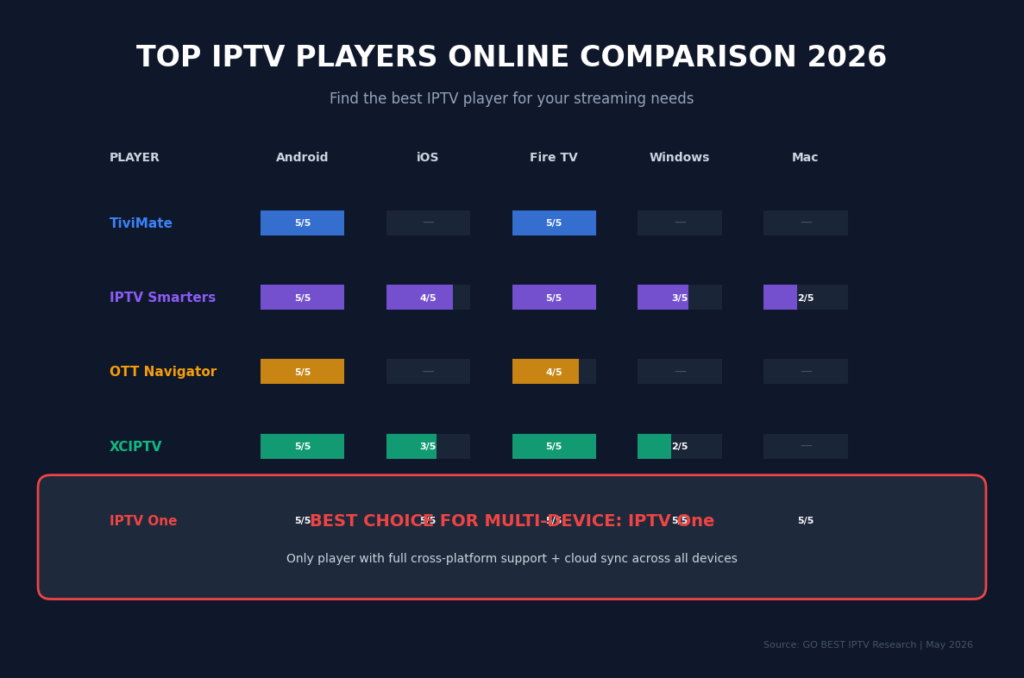
After extensive testing across all major platforms, here are the top IPTV players online ranked by performance, compatibility, and features:
1. TiviMate — Best for Android TV & Fire Stick
TiviMate remains the gold standard for Android TV and Amazon Fire TV users. With a polished interface, reliable M3U/Xtream Codes support, and responsive EPG, it’s the most-cited player in Android-focused roundups — and that reputation is earned
.
Key Features:
- Scheduled recordings and multiple playlists
- Customizable TV Guide with channel logos
- Auto frame rate switching and subtitle support
- Parental controls and Picture-in-Picture (premium)
- One-time lifetime license: $33.99
The Catch: TiviMate only runs on Android TV and Fire TV. No iPhone, no Apple TV, no Windows, no Mac, no Linux — and zero cloud sync between devices
.
Best for: Households with exclusively Android/Fire TV devices who don’t need multi-device access.
2. IPTV Smarters Pro — Widely Compatible but Aging
IPTV Smarters Pro runs on Android, Fire TV, and iOS — broader than TiviMate, but still missing Apple TV, Mac, Windows, and Linux
. It supports M3U, Xtream Codes, and Stalker Portal, making it one of the more format-flexible players.
Key Features:
- Clean, user-friendly interface
- Built-in VPN support
- External video player integration (MX Player, VLC)
- Parental controls and multi-screen viewing
- Free version available
The Downside: The interface feels dated compared to modern alternatives. The iOS version lags behind Android in stability. No cross-device sync exists
.
Best for: Users who need Stalker Portal support on Android/Fire TV and don’t mind an older UI.
3. OTT Navigator — Best for Advanced Android Users
OTT Navigator is a technically capable player with solid Xtream Codes and Stalker Portal support, good EPG functionality, and a highly customizable interface
.
Key Features:
- Deep customization options for power users
- Fast playback with minimal buffering
- Premium: $0.99/month or $19.99 lifetime
- User profiles and sleep timer
The Trade-off: The customization that makes it powerful also makes it complex. Expect a learning curve. No iOS, Apple TV, Mac, Windows, or Linux support. No cloud sync
.
Best for: Advanced Android users who want granular control over their setup.
4. XCIPTV — Best Free IPTV Player Online
XCIPTV is widely considered the best free IPTV player available for Fire TV and Android TV
. It’s completely free, easy to install, and provides a useful interface with TV Guide support.
Key Features:
- 100% free with no hidden costs
- Works with external video players to reduce buffering
- MAC address integration
- Favorites manager and search function
- Customer support via official website
Limitations: Less polished than premium alternatives. Limited advanced features.
Best for: Budget-conscious users who want a reliable free option.
5. IPTV One — Best Overall IPTV Player Online (All Devices)
IPTV One is the only IPTV player that runs natively on all 8 major platforms — Android, Android TV, Fire TV, iPhone, iPad, Apple TV, Mac, Windows, and Linux — with a single account that syncs your favorites, watch history, and channel groups across every device
.
Why It Stands Out:
- True cross-platform sync: Pause a match on your iPhone, resume on Apple TV. Add a channel on Windows, find it on Fire TV instantly .
- Format support: M3U/M3U8, Xtream Codes API, and Stalker Portal
- Playback quality: 4K Ultra HD, HDR10, HDR10+, Dolby Vision
- Hardware acceleration: H.265/HEVC, VP9, and AV1 decoding
- Smart EPG: TMDb metadata enrichment with automatic artwork
Best for: Multi-device households who want one app that truly works everywhere.
How to Set Up Your IPTV Player Online
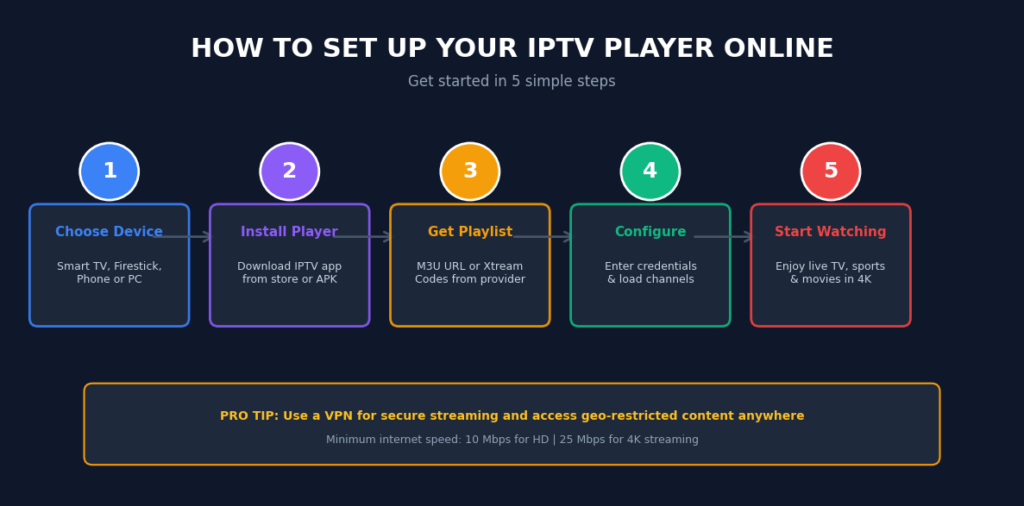
Getting started with any IPTV player online follows a similar pattern. Here’s the universal setup process:
Step 1: Choose Your Device
Supported devices include Smart TVs, Android TV boxes, Amazon Firestick, smartphones, tablets, and PCs
.
Step 2: Install the IPTV Player
Download your chosen app from the official store (Google Play, App Store, Microsoft Store) or sideload via APK for Fire TV devices
.
Step 3: Obtain Your Playlist
After subscribing to an IPTV service, you’ll receive either:
- An M3U URL playlist link
- Xtream Codes API credentials (username, password, server URL)
- Stalker Portal address
Step 4: Configure the Player
Enter your credentials into the app. Most players auto-detect and organize channels, EPG data, and VOD content.
Step 5: Start Streaming
Once configured, channels and on-demand content are available instantly. Organize favorites, set up parental controls, and customize your EPG layout
.
IPTV Player Online: Device-Specific Recommendations
For Fire TV Stick Users
The Amazon Fire TV Stick remains the most popular streaming device for IPTV. TiviMate paired with a reliable provider delivers the best experience
. For free alternatives, XCIPTV works beautifully. Avoid 1st and 2nd generation Firesticks — RAM limitations create buffering that looks like a provider issue
.
For Android TV Users
TiviMate and OTT Navigator lead the pack. Both offer deep customization, fast channel switching, and excellent EPG integration
.
For iPhone & Apple TV Users
Options are more limited. IPTVX works well within the Apple ecosystem but only supports M3U playlists
. For full format support across Apple devices, IPTV One is the better choice.
For Windows & Mac Users
Most IPTV players ignore desktop users entirely. IPTV One and web-based players fill this gap. Alternatively, Kodi with PVR Simple Client works across all desktop platforms
.
Essential Features to Look For in an IPTV Player Online
When evaluating any IPTV player online, prioritize these features:Table
| Feature | Why It Matters |
|---|---|
| Multi-format Support | M3U, Xtream Codes, and Stalker Portal cover 99% of providers |
| EPG Integration | Electronic Program Guide shows what’s playing now and next |
| Cloud Sync | Keep favorites and history across all devices |
| Recording | Save live TV to watch later (premium feature) |
| 4K/HDR Support | Future-proof your setup as content quality improves |
| External Player | Option to use VLC or MX Player for better performance |
| VPN Compatibility | Essential for privacy and geo-restricted content |
Common IPTV Player Issues & How to Fix Them
Buffering During Playback
Buffering occurs when your internet connection can’t sustain the streaming bitrate. Solution: Ensure at least 25 Mbps for 4K or 10 Mbps for HD streaming. If speed is adequate, the issue is likely provider server overload
.
Channels Not Loading
Server congestion can cause temporary channel failures. Solution: Restart the app, switch servers if available, or contact your provider
.
EPG Not Showing
EPG data requires separate configuration. Solution: Check that your playlist includes EPG URL, or manually add a program guide source in player settings.
Audio/Video Sync Issues
Solution: Enable hardware acceleration in player settings, or switch to an external player like VLC
.
Is Using an IPTV Player Online Legal?
Yes — IPTV player apps themselves are 100% legal software. They are media players, similar to VLC or Kodi, that play playlist files you provide
. The player does not host, distribute, or provide any content.
The legality depends on your content source. Always ensure your IPTV subscription comes from a legitimate provider with proper licensing rights
.
Frequently Asked Questions (FAQ)
What is the best IPTV player online in 2026?
For multi-device households, IPTV One is the best IPTV player online because it’s the only app covering all 8 major platforms with cross-platform cloud sync
. For Android-only setups, TiviMate remains excellent
.
Can I use an IPTV player online for free?
Yes. XCIPTV offers a completely free, full-featured experience for Fire TV and Android
. Many premium players also offer free tiers with core functionality.
What internet speed do I need for IPTV?
Minimum: 10 Mbps for HD streaming. Recommended: 25+ Mbps for 4K content. For households running 3-4 simultaneous streams, aim for 50+ Mbps
.
Does TiviMate work on iPhone or Windows?
No. TiviMate is strictly limited to Android TV and Fire TV devices. It does not support iPhone, iPad, Apple TV, Windows, Mac, or Linux
.
What playlist formats do IPTV players support?
The three dominant formats are M3U/M3U8 URLs, Xtream Codes API, and Stalker Portal. Top players like IPTV One support all three
.
How do I install IPTV on Firestick?
Search for your player in the Amazon Appstore, or use the Downloader app to sideload APK files. Enable “Apps from Unknown Sources” in Firestick settings first
.
Can I watch IPTV on my phone?
Absolutely. Most IPTV players online offer Android and iOS apps, letting you stream live TV, sports, and on-demand content on the go
.
Final Verdict: Choosing Your IPTV Player Online
The “best” IPTV player online depends entirely on your device ecosystem:
- Android/Fire TV only? → TiviMate is polished and powerful
- Need a free option? → XCIPTV delivers without costing a dime
- Apple ecosystem only? → IPTVX works well for M3U playlists
- Multiple device types? → IPTV One is the only player that covers all platforms with cloud sync